

Manage products
Products are the core units sold in a store, containing essential details like name, description, price, and stock status. A product management app enables merchants to efficiently organize their catalog, update details in real time, and maintain data consistency across multiple sales channels.
This section explains how to use RESTful APIs to manage products, covering creation, editing, deletion, authentication, and error handling.
Product object relationships
Before performing API operations such as querying, creating, editing, or deleting products, it's essential to understand how product objects relate to each other. The diagram below illustrates the relationships between products, variants, collections, and categories, helping you correctly pass and use data.
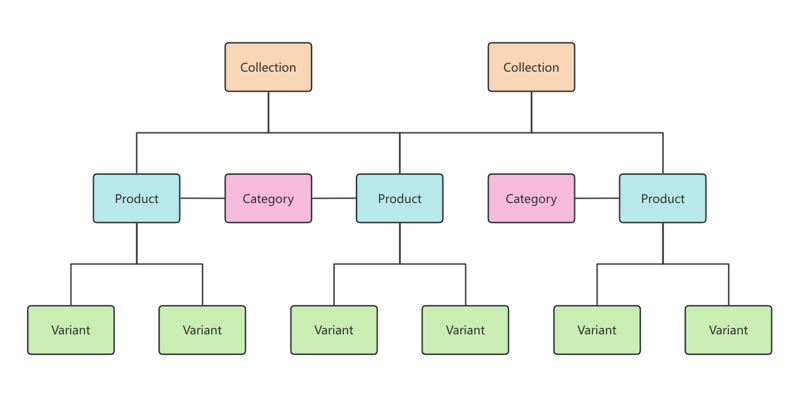
| API object | Description |
|---|---|
| Product | Represents a sellable item, including key details like title, description, status, and type (SPU). |
| Variant | The SKU of a product, containing details such as price, stock, description, and images. Variants represent what customers see when shopping. A product can have multiple variants (1:N). |
| Collection | A curated group of products organized based on specific rules or themes (e.g., discounts, brand, seasonal items). Products can belong to multiple collections (M:N). |
| Category | A classification system for grouping similar products, aiding in management, filtering, and recommendations. Each product belongs to one category (N:1). |
API overview
| API endpoint | Description |
|---|---|
/api/202412/category/search | Retrieve product categories |
/api/202412/collections | Retrieve product collections |
/api/202412/products | Create a new product |
/api/202412/products/{productId} | Get, edit, or delete a product (depending on the HTTP method) |
Use case: Create a product
Overview
Before creating a product, the app needs to retrieve category and collection data to correctly assign the product. Categories help with classification, while collections allow products to be grouped based on rules such as discounts, brands, or seasonal promotions.
Step 1: Retrieve category information
To ensure accurate product categorization, query the product category API to obtain the relevant category ID.
Request:
GET /api/202412/category/search
curl -X GET \
"https://{shop}.genmystore.com/api/202412/category/search?categoryName=pet" \
-H "X-Genstore-Access-Token: {access_token}" \
Response:
HTTP/1.1 200 OK
{
  "productCategories": [
    {
      "parentCategoryId": "209148956144",
      "categoryName": "pet",
      "categoryId": "209148956145"
    }
  ]
}
Step 2: Retrieve collection information
To group the product under a collection, query the collection API and retrieve the collection ID.
Request:
GET /api/202412/collections
curl -X GET \
"https://{shop}.genmystore.com/api/202412/collections?title=CollectionTest&collectionType=1" \
-H "X-Genstore-Access-Token: {access_token}" \
Response:
HTTP/1.1 200 OK
{
  "collections": [
    {
      "collectionType": "1",
      "image": {
        "src": "https://cdn.shopify.com/s/files/1/0600/8317/5513/files/wax-special_150x.png?v=1716260624"
      },
      "bodyHtml": "<p>Test Description</p>",
      "published": "true",
      "title": "CollectionTest",
      "collectionId": "102984300756584",
      "collects": "[102744899756584,102744899756583]",
      "countGoodsNum": "3"
    }
  ]
}
Step 3: Create a product
After obtaining the necessary category and collection information, call the product API to create a product.
Request:
POST /api/202412/products
curl -X POST \
"https://{shop}.genmystore.com/api/202412/products" \
-H "X-Genstore-Access-Token: {access_token}" \
-H "Content-Type: application/json" \
-d '{
	"product":{
		"isMultiVariant":"false",
		"images":[
			{
				"src":"https://blaze.com/s/files/Main_c8ff0b5d-c712-429a-be00-b29bd55cbc9d_40x40@3x.jpg?v=1716260620",
				"position":"1"
			}
		],
		"variants":[
			{
				"inventoryManagement":"true",
				"price":"10",
				"costPrice":"3",
				"options":[
					{
						"name":"size",
						"position":"1",
						"value":{
							"name":"L",
							"position":"1"
						}
					}
				],
				"weight":"1",
				"isDisabled":"false",
				"sku":"P001",
				"compareOfPrice":"22",
				"barcode":"AXOYX49XOPEX6",
				"inventoryQuantities":[
					{
						"locationId":"50002",
						"available":"666"
					}
				],
				"weightUnit":"kg"
			}
		],
		"marketAssigns":[
			{
				"isAssigned":"true",
				"marketId":"6016662702584"
			}
		],
		"categoryId": "209148956145",
		"title":"shirt",
		"subTitle":"wool shirt",
		"collections":"[102984300756584]",
		"vendor":"nike",
		"options":[
			{
				"name":"size",
				"position":"1",
				"value":[
					{
						"name":"L",
						"position":"1"
					}
				]
			}
		],
		"bodyHtml":"<p>wool shirt</p>",
		"productType":"normal",
		"status":"active"
	}
}'
Response:
HTTP/1.1 200 OK
{
  "product": {
    "isMultiVariant": "false",
    "images": [
      {
        "productId": "102745140756584",
        "src": "https://blaze.com/s/files/Main_c8ff0b5d-c712-429a-be00-b29bd55cbc9d_40x40@3x.jpg?v=1716260620",
        "position": "1"
      }
    ],
    "productId": "102745140756584",
    "variants": [
      {
        "inventoryManagement": "true",
        "productId": "102744460756584",
        "costPrice": "3",
        "weight": "1",
        "compareOfPrice": "22",
        "inventoryQuantities": [
          {
            "locationId": "50002",
            "available": "666"
          }
        ],
        "price": "10",
        "options": [
          {
            "name": "size",
            "id": "10034623756584",
            "position": "1",
            "value": {
              "name": "L",
              "id": "10167791756584",
              "position": "1"
            }
          }
        ],
        "variantId": "107362030756584",
        "isDisabled": "false",
        "sku": "P001",
        "barcode": "AXOYX49XOPEX6",
        "weightUnit": "kg"
      }
    ],
    "marketAssigns": [
      {
        "isAssigned": "true",
        "marketId": "6016662702584"
      }
    ],
    "categoryId": "209148956145",
    "title": "shirt",
    "subTitle": "wool shirt",
    "collections": "[102984300756584]",
    "vendor": "nike",
    "options": [
      {
        "name": "size",
        "id": "10034623756584",
        "position": "1",
        "value": [
          {
            "name": "L",
            "id": "10167791756584",
            "position": "1"
          }
        ]
      }
    ],
    "bodyHtml": "<p>wool shirt</p>",
    "productType": "normal",
    "status": "active"
  }
}
Use case: Edit a product
Overview
Once a product is created, merchants may need to update details such as pricing, descriptions, or inventory levels. This process involves retrieving the product details, modifying necessary fields, and sending an update request.
Step 1: Retrieve product details
Before making changes, fetch the product's existing details using the product API.
Request:
GET /api/202412/products/{productId}
curl -X GET \
"https://{shop}.genmystore.com/api/202412/products/{productId}" \
-H "X-Genstore-Access-Token: {access_token}" \
Response:
HTTP/1.1 200 OK
{
  "product": {
    "isMultiVariant": "false",
    "salesChannels": [
      {
        "salesChannelCode": "onlineStore"
      }
    ],
    "images": [
      {
        "productId": "102745140756584",
        "src": "https://blaze.com/s/files/Main_c8ff0b5d-c712-429a-be00-b29bd55cbc9d_40x40@3x.jpg?v=1716260620",
        "position": "1"
      }
    ],
    "productId": "102745140756584",
    "variants": [
      {
        "inventoryManagement": "true",
        "productId": "102744460756584",
        "costPrice": "3",
        "weight": "1",
        "compareOfPrice": "22",
        "inventoryQuantities": [
          {
            "locationId": "50002",
            "available": "666"
          }
        ],
        "price": "10",
        "options": [
          {
            "name": "size",
            "id": "10034623756584",
            "position": "1",
            "value": {
              "name": "L",
              "id": "10167791756584",
              "position": "1"
            }
          }
        ],
        "variantId": "107362030756584",
        "isDisabled": "false",
        "sku": "P001",
        "barcode": "AXOYX49XOPEX6",
        "weightUnit": "kg"
      }
    ],
    "marketAssigns": [
      {
        "isAssigned": "true",
        "marketId": "6016662702584"
      }
    ],
    "title": "shirt",
    "productCategory": {
      "categoryName": "pet",
      "categoryId": "209148956145"
    },
    "subTitle": "wool shirt",
    "collections": "[102984300756584]",
    "vendor": "nike",
    "options": [
      {
        "name": "size",
        "id": "10034623756584",
        "position": "1",
        "value": [
          {
            "name": "L",
            "id": "10167791756584",
            "position": "1"
          }
        ]
      }
    ],
    "bodyHtml": "<p>wool shirt</p>",
    "productType": "normal",
    "status": "active"
  }
}
Step 2: Update product details
Modify the product details and send a PUT request to update the record.
Request:
PUT /api/202412/products/{productId}
curl -X PUT \
"https://{shop}.genmystore.com/api/202412/products/{productId}" \
-H "X-Genstore-Access-Token: {access_token}" \
-H "Content-Type: application/json" \
-d '{
	"product":{
		"isMultiVariant":"false",

		"images":[
			{
				"productId":"102745140756584",
				"src":"https://blaze.com/s/files/Main_c8ff0b5d-c712-429a-be00-b29bd55cbc9d_40x40@3x.jpg?v=1716260620",
				"position":"1"
			}
		],
		"productId":"102745140756584",
		"variants":[
			{
				"inventoryManagement":"true",
				"productId":"102744460756584",
				"costPrice":"3",
				"weight":"1",
				"compareOfPrice":"22",
				"inventoryQuantities":[
					{
						"locationId":"50002",
						"available":"666"
					}
				],
				"price":"10",
				"options":[
					{
						"name":"size",
						"id":"10034623756584",
						"position":"1",
						"value":{
							"name":"L",
							"id":"10167791756584",
							"position":"1"
						}
					}
				],
				"variantId":"107362030756584",
				"isDisabled":"false",
				"sku":"P001",
				"barcode":"AXOYX49XOPEX6",
				"weightUnit":"kg"
			}
		],
		"marketAssigns":[
			{
				"isAssigned":"true",
				"marketId":"6016662702584"
			}
		],
		"categoryId": "209148956145",
		"title":"shirt",
		"subTitle":"wool shirt",
		"collections":"[107363170756584]",
		"vendor":"nike",
		"options":[
			{
				"name":"size",
				"id":"10034623756584",
				"position":"1",
				"value":[
					{
						"name":"L",
						"id":"10167791756584",
						"position":"1"
					}
				]
			}
		],
		"bodyHtml":"<p>wool shirt</p>",
		"productType":"normal",
		"status":"active"
	}
}'
Response:
HTTP/1.1 200 OK
{
  "product": {
    "isMultiVariant": "false",
    "images": [
      {
        "productId": "102745140756584",
        "src": "https://blaze.com/s/files/Main_c8ff0b5d-c712-429a-be00-b29bd55cbc9d_40x40@3x.jpg?v=1716260620",
        "position": "1"
      }
    ],
    "productId": "102745140756584",
    "variants": [
      {
        "inventoryManagement": "true",
        "productId": "102744460756584",
        "costPrice": "3",
        "weight": "1",
        "compareOfPrice": "22",
        "inventoryQuantities": [
          {
            "locationId": "50002",
            "available": "666"
          }
        ],
        "price": "10",
        "options": [
          {
            "name": "size",
            "id": "10034623756584",
            "position": "1",
            "value": {
              "name": "L",
              "id": "10167791756584",
              "position": "1"
            }
          }
        ],
        "variantId": "107362030756584",
        "isDisabled": "false",
        "sku": "P001",
        "barcode": "AXOYX49XOPEX6",
        "weightUnit": "kg"
      }
    ],
    "marketAssigns": [
      {
        "isAssigned": "true",
        "marketId": "6016662702584"
      }
    ],
    "categoryId": "209148956145",
    "title": "shirt",
    "subTitle": "wool shirt",
    "collections": "[102984300756584]",
    "vendor": "nike",
    "options": [
      {
        "name": "size",
        "id": "10034623756584",
        "position": "1",
        "value": [
          {
            "name": "L",
            "id": "10167791756584",
            "position": "1"
          }
        ]
      }
    ],
    "bodyHtml": "<p>wool shirt</p>",
    "productType": "normal",
    "status": "active"
  }
}
Use case: Delete a product
Overview
When a product is discontinued or removed from the store, the app needs to delete it using the product API.
Request:
DELETE /api/202412/products/{productId}
curl -X DELETE \
"https://{shop}.genmystore.com/api/202412/products/{productId}" \
-H "X-Genstore-Access-Token: {access_token}" \Response:
HTTP/1.1 200 OK
{}
Webhook
Apps can subscribe to the following webhooks to receive real-time updates when products are created, updated, or deleted.
| Webhook topic | Description |
|---|---|
products/create | Triggered when a product is created |
products/update | Triggered when a product is updated |
products/delete | Triggered when a product is deleted |